Ledgerline covers the practical work of buying enterprise AI: choosing a platform, comparing what the quote includes and deciding who will keep it running. Last updated:
Dify is a strong alternative when deployment choice matters and your engineers can take responsibility for the applications and their operation. Compare that ownership work alongside the software.8,1,5This is our reading of the cited material for a buyer with this need. We have not measured the product’s performance.
Best for
Engineering-led organizations with named infrastructure and application owners.
Avoid when
You expect installation to include designing, evaluating and looking after the business workflow.
Dify: an open platform for teams that want to build their own AI applications
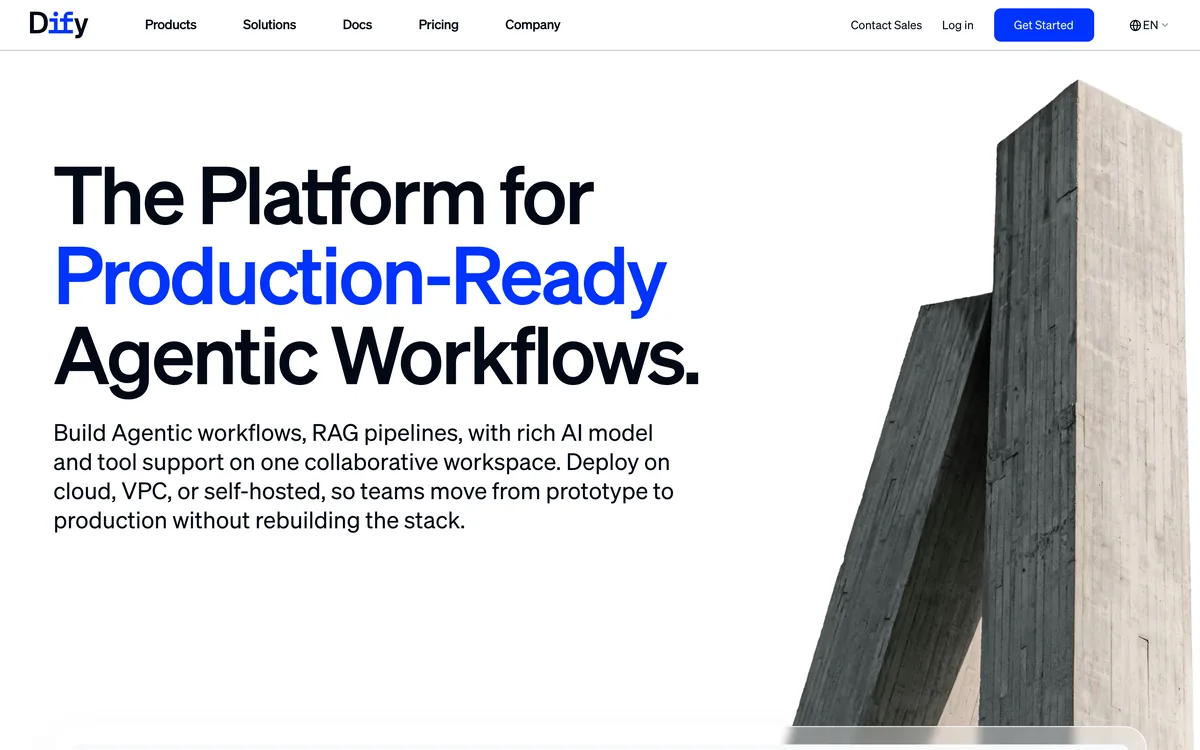
Dify: Dify homepage with the headline the platform for production ready agentic workflows. Source: dify.ai, checked November 9, 2026.
Every organisation that wants to put language models to work reaches the same decision early. It can assemble the application layer itself, or it can adopt a platform that already holds the workflow canvas, the retrieval pipeline and the publishing step. Dify is an answer from the platform side, and one with an unusual amount of public documentation behind it. The documentation describes it as an open-source platform for building AI applications9, the GitHub repository calls it an open-source LLM app development platform10, and the homepage title positions it as the platform for production-ready agentic workflows11. The repository shows more than 160,000 stars12, which is a measure of developer attention and says little about production use on its own.
The first thing a buyer should settle is what "open" means here. The homepage lists the Community Edition as source-available13 and describes its license as Apache-2.0-derivative14. The license file in the repository is more exact: it is a modified version of the Apache License 2.0 with additional conditions15. One of those conditions matters a great deal to anyone planning a shared service, and it is covered in the section on limits below. The practical reading is that the code can be inspected and run, while the license terms deserve the same legal review as any commercial agreement.
Dify is built for people who want to do the building themselves. That shapes everything in this assessment. The strengths lie in breadth of deployment, in published plan limits and in documentation detailed enough to plan from. The questions a buyer should ask concern how much engineering and operating capacity the organisation is prepared to supply.
What the product is
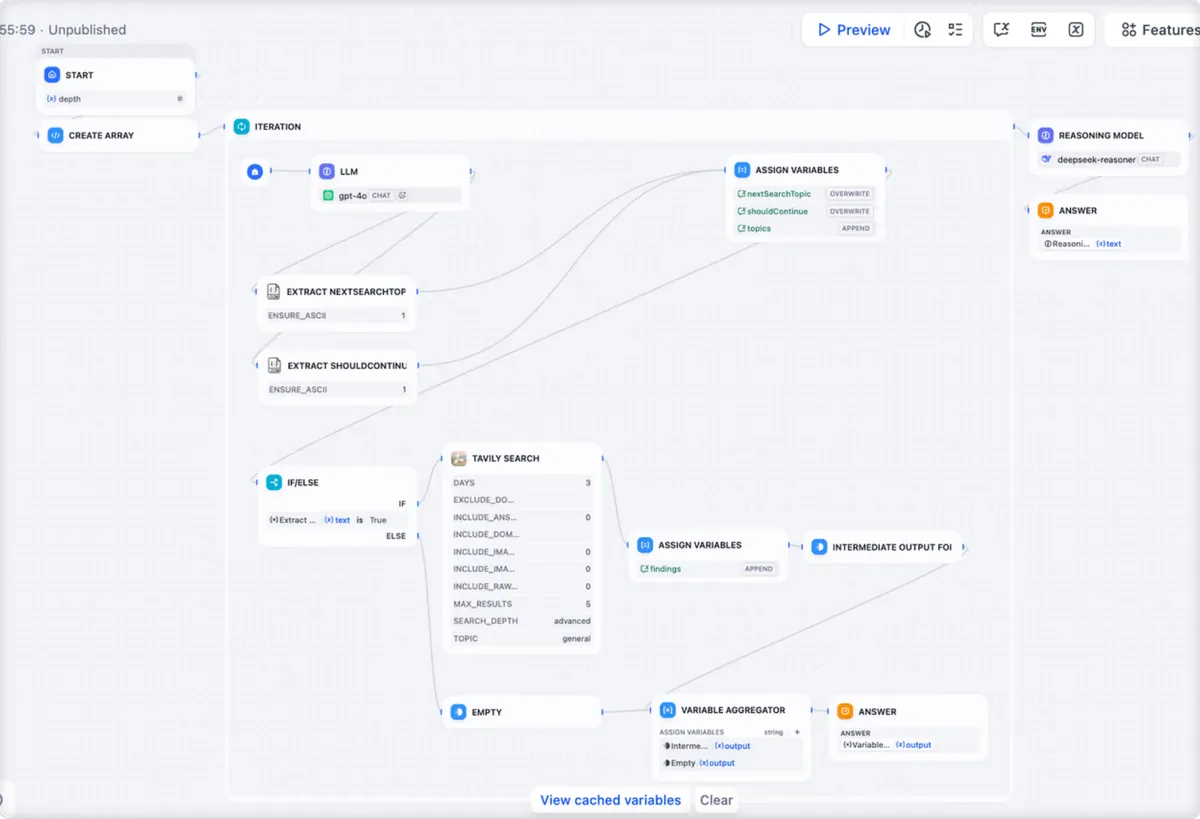
The centre of the product is Workflow Studio, which the homepage describes as a visual builder for agentic workflows16. Agents can be built in two ways: by chatting with the builder, or by configuring it manually17. Those two routes suit different people on the same team, since a business specialist may prefer to describe an agent in conversation while a developer may want to set each parameter by hand. The GitHub repository adds that agents have a sandbox of their own in which they run commands and handle files18.
Knowledge is the second main component. The Knowledge Pipeline creates repeatable pipelines for files, websites, online documents and drives19. Dify also offers what its documentation calls a classic knowledge base, in which the customer decides how content is chunked, indexed and searched20. For a team with firm views on retrieval quality, that degree of control is useful. It also means that the quality of the outcome depends on decisions the team has to make and maintain.
The third component is distribution. Finished applications can be published as hosted experiences, API endpoints, embeds or MCP-compatible tools21, and the repository states that all of Dify's offerings come with corresponding APIs22. An application can therefore be placed in front of end users, called from another system, or offered to other agents as a tool, from the same build. The repository also says application logs and performance can be monitored and analysed over time23, which gives operators a basis for judging whether an application is improving after launch.
Getting started: managed cloud or your own infrastructure
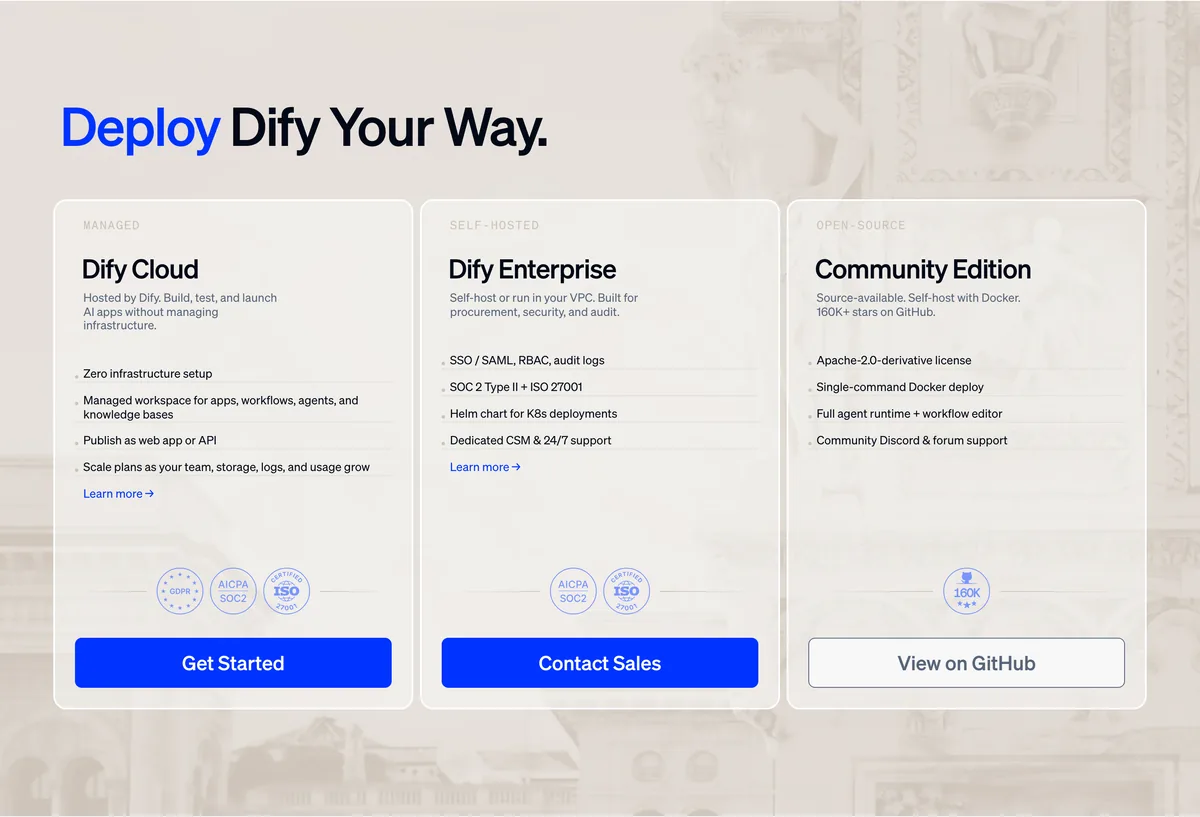
Dify: three ways to run Dify: Dify Cloud, Dify Enterprise and the Community Edition. Source: dify.ai, checked November 9, 2026.
Dify offers two very different starting points. Dify Cloud is hosted by the vendor and carries no infrastructure to manage24. Sign-up gives a managed platform with no installation and a free Sandbox plan25, so a team can evaluate the builder within a working session and without involving its infrastructure group.
The second route is self-hosting, and the documentation is specific about it. Dify says it runs anywhere Docker runs, naming a laptop, an on-premises server and a cloud VM26. The homepage lists a single-command Docker deploy for the Community Edition27 and a Helm chart for Kubernetes deployments28. The Docker guide requires Docker Compose 2.35.0 or later29, and sets the minimum hardware at 2 CPU cores30 and 4 GiB of RAM31. On macOS, the guide advises giving Docker Desktop at least 2 virtual CPUs and 8 GiB of memory32.
The installation itself has a small number of steps that a first-time operator should note. A shared token must be generated before first start, because the agent backend and its local sandbox need it to start33. After startup, the administrator account is created in the browser at the install page34. The default deployment bundles PostgreSQL, Weaviate and the other services it needs35, which keeps a first installation simple.
The guide also carries a few operating instructions that show a sensible security posture. The default stack publishes no host ports for the database, Redis, the Code sandbox or Weaviate36. The same guide tells operators to replace the bundled development credentials in the docker/.env file37, a step that belongs on any production checklist. For upgrades, it instructs operators to use up -d, because docker compose restart keeps the old container environment38. Instructions at this level of precision make it possible for a platform team to estimate the operating work in advance.
Integrations and tools
Dify treats integrations as an installable layer. They connect applications to model providers, tools, data sources and external services39. The homepage says these can be installed from the Marketplace or defined by the customer40. Tools, in Dify's terminology, include tool plugins, MCP servers, published workflows and OpenAPI services41. Knowledge data sources include Google Drive and Notion pages42, and custom endpoints connect the customer's own API for content moderation or external data tools43.
The sources of an integration matter for anyone responsible for software supply. Marketplace integrations are reviewed and tested before publication and then maintained by their publisher44. Integrations can also be installed from any public GitHub repository by URL and version45, and private or internal integrations can be installed from a local .difypkg package46. These are three distinct levels of assurance, and a security team will want a policy for each one. The platform gives it a control point for that policy: the workspace owner and admins decide who can install and debug integrations47, and a separate debug permission covers the debugging key for integrations under development48.
Plans also meter how often outside events can start an application. The Sandbox plan includes 3,000 trigger events49, the Professional plan includes 20,000 per month50, and the Team plan lists unlimited trigger events51. Teams planning event-driven automation should size their expected volume against these numbers before choosing a plan.
Security and certifications
The homepage lists SOC 2 Type II and ISO 27001 for Dify Enterprise52. Buyers should note that this entry is attached to the Enterprise offering and confirm its scope with the vendor when the deployment model is decided. The enterprise page sets out the expected controls in short statements: single sign-on through SAML or OIDC53, tamper-evident audit logs streamed to the customer's SIEM54, and bring-your-own-key encryption55.
The privacy policy adds general measures that apply to the company's handling of personal information. Its technical measures include encryption of communications and data, access control, and the detection and prevention of unauthorized access56, and it lists education and training of employees on the protection of personal information as a human measure57. For the open code base, the repository directs researchers to report vulnerabilities privately through GitHub Security Advisories58, which gives a defined channel for disclosure.
Where the data goes
Dify offers several data handling deployment options5,59,60, and the choice is made through the deployment model. Dify Enterprise can be deployed inside the customer's own VPC, on premises or in an air-gapped network5. A Dify-managed dedicated option places the customer on a single-tenant cluster in its region59. The customer-managed VPC option runs in the customer's AWS, GCP or Azure account, and the vendor says that data never leaves the customer's security perimeter there60. The air-gapped option can run fully offline with locally deployed models61. The enterprise page summarises data residency as keeping data inside the customer's VPC, region and perimeter62.
The model question sits alongside the hosting question. The privacy policy says Dify does not train AI models itself and will not use AI interaction data for model training63. Where a customer selects its own model provider and API key, interaction data is transmitted directly to that provider for processing64. Where Dify selects the models, the AI model providers act as Dify's sub-processors65. A data protection officer will want to know which of those two arrangements applies to each application.
Buyers with strict location requirements should read one further sentence closely. The privacy policy says information may be stored and processed in any country or region where LangGenius or its affiliated companies or service providers maintain facilities66. The enterprise deployment options above are the route described for customers who need to fix the location of their data.
Governance and permissions
Workspace roles are documented clearly and are easy to reason about. The Owner has full control of the workspace, and each workspace has one Owner67. An Admin manages members and model providers and can do everything an Editor can68. An Editor creates, edits and deletes applications and knowledge bases69. A Normal member uses published applications only70. That last role is the useful one for wide rollouts, because it separates the many people who consume an application from the few who may change it.
Several small rules show that the access lifecycle has been considered. Invitation links expire after 72 hours71. Removing a member revokes workspace access right away72. Ownership transfer is confirmed with a verification code emailed to the Owner73.
The enterprise tier goes further. It offers fine-grained role-based access control down to workflow level, together with SCIM provisioning and session policies4, and it includes multiple workspaces and enterprise management74. Large organisations with several business units are the natural audience for those features.
Pricing and commercial terms
Dify publishes its cloud prices, which makes early budgeting straightforward. The Sandbox plan is free and includes 200 message credits75. The Professional plan costs $590 per workspace per year76 and includes 5,000 message credits per month77. The Team plan costs $1590 per workspace per year78. Annual billing saves 17 percent on the cloud plans79. The Enterprise plan is custom priced80. Once message credits are used up, the customer can switch to its own API key7, so model spending can move to the customer's own account with a provider.
Plan changes follow simple rules. An upgrade takes effect immediately, once the customer pays the difference for the rest of the current billing period81. A downgrade takes effect at the start of the next billing cycle82. Current students, teachers and educational staff can verify their affiliation to use the Yearly Professional plan for free83, through a Dify for Education program on the billing page84.
Where Dify fits
The plan descriptions state the intended audience directly. The Professional plan is for developers working alone and small teams building production AI applications85. The Team plan is for medium-sized teams that need collaboration and higher throughput86. The Enterprise plan is for enterprises that require advanced security, compliance, governance and dedicated support87. The Community Edition is for open-source enthusiasts, individual developers and non-commercial projects88.
Dify's solutions listing names several sectors. For education it offers one knowledge base for multi-campus services89. For the public sector it describes deploying locally and sharing securely across institutions90. For pharma and life sciences it describes governed expert-level AI assistants91. For consumer goods it describes letting business teams build their own agents92. The enterprise page also publishes customer results, one on build time per application compared with four months for a self-built approach93 and one on the number of business users trained to build AI agents in FY202594. These are claims published by the vendor, and a buyer should ask for the underlying detail.
The pattern across these descriptions is consistent. Dify suits an organisation that has people who will build, wants control over where the software and data sit, and is prepared to take responsibility for the applications it creates.
Limits worth planning for
The limits below come from Dify's own pages95,96,97, and publishing them plainly is to the vendor's credit. The Sandbox plan allows 1 team member95, 10 knowledge requests per minute97 and 30 days of log history98. The Professional plan allows 3 members96. A team should treat the Sandbox as an evaluation environment and count its builders before it chooses a paid tier.
Knowledge storage is capped per plan, and once usage reaches the limit, neither kind of knowledge base can add content99. Before indexing, Dify may refuse an upload based on how much storage it is estimated to take100. Adding content stays blocked until usage fits the limit or the plan is upgraded101, while searching and deleting keep working102. A growing corpus should therefore be watched against the cap. Separately, external knowledge bases and those built as a Knowledge Pipeline cannot be upgraded to agent knowledge bases103, which is worth knowing before a team commits to one structure.
For self-hosters, the storage engine is an early and lasting decision. Changing DB_TYPE or VECTOR_STORE does not migrate data104, and switching the bundled vector store or database after the first start does not move existing data105. The Community Edition is a single workspace106. The license bars use of the source code to operate a multi-tenant environment without written authorization107, so an organisation planning to serve many separate tenants from a self-hosted copy needs to clear that with the vendor first. The education offer has its own restriction, since ticket and priority email support are not included108.
Verdict
Dify is a serious option for organisations that want to build and run AI applications with their own people. Its public record is strong on deployment choice, from a managed cloud to an air-gapped network, on published prices and plan limits, and on role definitions a governance team can read and apply. Its fit depends on the buyer's capacity to do the work, since the platform supplies the tools and the customer's team carries the design of the workflows, the retrieval choices and, when self-hosting, the operation of the stack. A team considering it can test the builder on the free Sandbox plan and then read the license and the Enterprise terms against its intended deployment.
Before choosing a deployment, assign an owner for upgrades, retrieval quality and incident handling. Then price the application with its expected model usage, storage and support needs. Dify's flexibility is most useful when that operating responsibility is explicit.
What buyers should test
We distinguish dated supplier documents, direct company confirmations and our own analysis. Documentation tells us what a supplier says; it does not prove how the product performs. Where the evidence leaves a question unanswered, we explain what your buying team still needs to ask.
Help with the build
Partly documented
Dify documents self-hosting with Docker Compose. Enterprise lists a customer success manager and support.1,2This is the supplier’s statement in material checked November 8, 2026. We have not tested it ourselves.
Evidence
Who looks after application behavior, upgrades, backups and incidents in your deployment?
Ask who handles discovery, setup, testing, support and changes, and what your team must have ready first.
Your existing systems
Partly documented
Dify provides a Marketplace for tools and integrations.3This is the supplier’s statement in material checked November 8, 2026. We have not tested it ourselves.
Evidence
Who maintains the connections you need, and can they perform your actions with the right credentials?
Ask to see the records and actions you need. Check sign-in, permissions, limits, custom work and who maintains each connection.
Checks you can see
Documented
Dify Enterprise lists access rules down to workflow level, SCIM user provisioning, session policies and audit controls.4,2This is the supplier’s statement in material checked November 8, 2026. We have not tested it ourselves.
Evidence
Which controls are included in your edition, and which must your infrastructure team configure?
Request evidence for the exact product. Ask to see access refused, approval requested, permission removed and the resulting action traced.
Where your data goes
Documented
Dify Enterprise describes deployment in a customer’s VPC, on premises or on an air-gapped network.5This is the supplier’s statement in material checked November 8, 2026. We have not tested it ourselves.
Evidence
Will model processing, plugins and logs stay inside the boundary you require as well?
Request a diagram of the data’s route, with hosting regions, model providers, retention rules and who gets access.
The full cost
Partly documented
Dify publishes cloud plans and a custom Enterprise option. Cloud users can switch to their own model API key after using their message credits.6,7This is the supplier’s statement in material checked November 8, 2026. We have not tested it ourselves.
Evidence
Does your estimate include infrastructure, model charges, staff, support and the license terms you will use?
Ask for an itemized proposal covering setup, software, usage, support, your own staff’s work, changes and what you receive when the service ends.
Sandbox plan includes 3,000 trigger events. dify.ai/pricing, checked November 8, 2026.
Professional plan includes 20,000 trigger events per month. dify.ai/pricing, checked November 8, 2026.
Team plan lists unlimited trigger events. dify.ai/pricing, checked November 8, 2026.
Homepage lists SOC 2 Type II + ISO 27001 for Dify Enterprise. dify.ai, checked November 8, 2026.
Enterprise identity uses SSO via SAML or OIDC. dify.ai/dify-enterprise, checked November 8, 2026.
Enterprise audit logs are tamper-evident and streamed to the customer's SIEM. dify.ai/dify-enterprise, checked November 8, 2026.
Enterprise encryption: bring-your-own-key encryption. dify.ai/dify-enterprise, checked November 8, 2026.
Privacy policy lists encryption of communications and data, access control, and detection and prevention of unauthorized access as technical measures. dify.ai/legal/privacy-policy, checked November 8, 2026.
Privacy policy lists employee training on personal information protection as a human measure. dify.ai/legal/privacy-policy, checked November 8, 2026.
Vulnerabilities are reported privately through GitHub Security Advisories. github.com/langgenius/dify, checked November 8, 2026.
Dify-managed dedicated option: a single-tenant cluster in the customer's region. dify.ai/dify-enterprise, checked November 8, 2026.
Customer-managed VPC option runs in the customer's AWS, GCP or Azure account; vendor says data never leaves the perimeter. dify.ai/dify-enterprise, checked November 8, 2026.
Air-gapped option can run fully offline with locally deployed models. dify.ai/dify-enterprise, checked November 8, 2026.
Enterprise data residency is described as keeping data inside the customer's VPC, region and perimeter. dify.ai/dify-enterprise, checked November 8, 2026.
Privacy policy says Dify does not train its own AI models and will not use AI interaction data for model training. dify.ai/legal/privacy-policy, checked November 8, 2026.
With a customer-chosen model provider and API key, interaction data goes directly to that provider. dify.ai/legal/privacy-policy, checked November 8, 2026.
With Dify-selected models, AI model providers act as Dify's sub-processors. dify.ai/legal/privacy-policy, checked November 8, 2026.
Privacy policy says information may be stored and processed in any country or region where LangGenius or its affiliates maintain facilities. dify.ai/legal/privacy-policy, checked November 8, 2026.
Professional plan is for separate developers and small teams building production AI apps. dify.ai/pricing, checked November 8, 2026.
Team plan is for medium-sized teams needing collaboration and higher throughput. dify.ai/pricing, checked November 8, 2026.
Enterprise plan is for enterprises requiring advanced security, compliance, governance and dedicated support. dify.ai/pricing, checked November 8, 2026.
Community Edition is for open-source enthusiasts, individual developers and non-commercial projects. dify.ai/pricing, checked November 8, 2026.
Solutions page lists education buyers: one knowledge base for multi-campus services. dify.ai, checked November 8, 2026.
Solutions page lists public-sector buyers: deploy locally and share securely across institutions. dify.ai, checked November 8, 2026.
Solutions page lists pharma and life-sciences buyers: governed expert-level AI assistants. dify.ai, checked November 8, 2026.
Solutions page lists consumer-goods buyers: let business teams build their own agents. dify.ai, checked November 8, 2026.
Enterprise page quotes a customer claim about per-app build time, down from 4 months self-built. dify.ai/dify-enterprise, checked November 8, 2026.
Enterprise page reports a customer claim that business users were trained to build AI agents (FY2025). dify.ai/dify-enterprise, checked November 8, 2026.